Monday, 22 February 2016

Starting my digipak

I opened up Adobe Photoshop to start my digipak however I have only had brief previous experience with this software, and I really couldn't get along with it. I found out about a Google app called Lucidpress, which is essentially like Photoshop but easier - although it doesn't have every photo editing technique like Photoshop, it has the basics that I need to achieve my desired product.

I started by inserting the digipak template into Lucidpress. The first step was to enlarge the template as I needed it to fill as much of the landscape background as possible. To do this without breaking the original dimensions of the template, I found out that there is an option to lock with width and height in the Layout tab. 


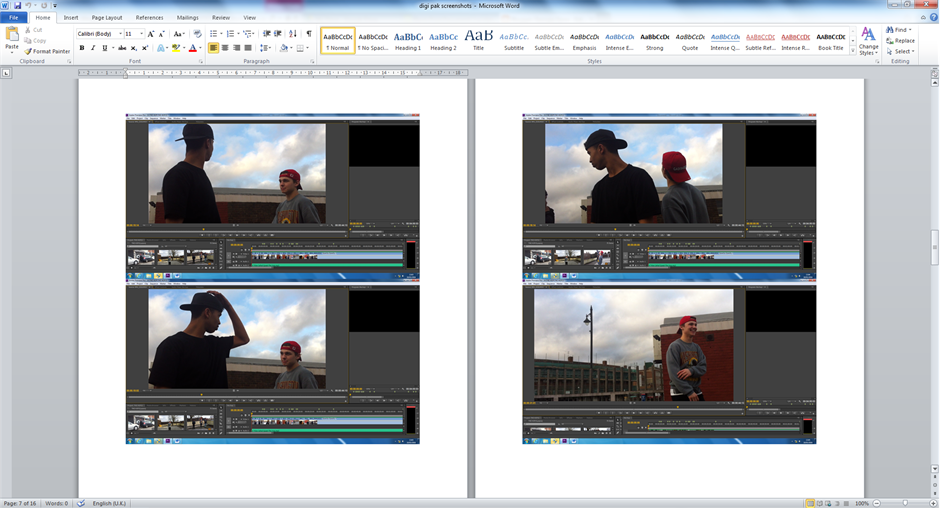
To link my digipak and music video, I have taken screenshots of my music video in Adobe Premiere Pro, and pasted the images into Microsoft Word, so that I have easy access to the images when it comes to deciding what to use on my digipak.


During filming, I took pictures of the dancers for potential front covers. Out of all the the photos there is one that I would like to use for the front, so I put the image into Photoshop to edit and managed to extend the background - i.e. the brick wall has been made higher and the concrete ground longer. This is because Lucidpress doesn't provide this option for more advanced editing, but it was simple to transfer the edited image onto the template in Lucidpress.


Thursday, 18 February 2016

Magazine Advert Research

As the digipak requires creating 6 different frames, I am hoping the magazine poster will be easier to make. There are not any templates for magazine posters, as they can be as unique as the artist. However, they must match the rest of my products in order to have a successful overall campaign for the song/album. Due to having to create lots of different covers for the digipak, I am going to complete my digipak first and make my magazine poster based on it.


In the mean time, I have researched a magazine poster for A Tribe Called Quest's album 'Midnight Marauders', to get inspiration for my own magazine advert. This one is also based on the digipak, as the front cover is featured in the centre. It promotes the 'first single and video: "Award Tour"', which is something I can include in my advert as I will be promoting my music video and ultimately the song too. It also adds a message from the artist at the bottom, "We hope you will find our Midnight Marauders presentation precise, bass heavy and just right". This is uncommon in magazine adverts however it adds a nice comment to the reader. Other than that, it includes the record label logo 'JIVE' and the artist logo, which are two things I will include in mine. 

Tuesday, 16 February 2016

Digipak Research

What is a digipak?

A digipak is a part of a campaign to promote the artist. A campaign will usually include:
  • Recognisable font used across the campaign (album posters and digipak)
  • Colour theme used throughout the campaign
  • Symbolic objects or pictures etc. things that link to the artist or video
Below shows a template of a digipak, which is helpful for me imagine and structure my own product. After researching other similar products, I will put this template into Adobe Photoshop and create my digipak over the top of it.


Saturday, 30 January 2016

Audience Feedback

I asked people in my media class and my siblings what they thought of my VHS Cam and PHHHOTO trial shots, and obtained feedback to discover what things are popular and what aren't.

  • The VHS Cam trial shots were more popular than the PHHHOTO shots, because they felt like it looked like more of a 90s atmosphere.
  • People didn't like the colour effect on VHS Cam, but the normal effect makes the colour in the shot look quite dull.
  • The colour in PHHHOTO shot is enhanced but it makes the shot look a bit grainy.
  • The back and forth effect of the PHHHOTO shots wasn't really appealing, and many people questioned what the point of it was.

Thursday, 28 January 2016

Trial Shots - PHHHOTO

PHHHOTO is a 'camera app that shoots moving pictures', which can be saved as videos and I had an idea to include these in my video, so I filmed different parts to trial the shots. It takes five photos of a moving scene and creates a video like a GIF, that repeats itself over and over. I like this effect as it makes the video more fun. Also, in my song we can hear vinyl scratching, so these videos might fit well here. I then imported the videos onto Adobe Premiere Pro to put them all into one sequence (below) and then put it onto YouTube for easy reference. 


I took these videos whilst on my holiday, so I wouldn't be able to use these in my music video as it would have a different scene to the rest of the video and not really work very well. The only issue with the video is that is creates an effect that is different from a normal camera, so it may look odd to include it at random parts in the music video. Using the effect the whole way through isn't an option as this would look very odd and extremely repetitive.